

Managing CIS & Domestic Reverse Charge VAT in Tool & Plant Hire
The UK Construction Industry Scheme (CIS) and the Domestic Reverse Charge (DRC) for VAT mean that tool and plant hire companies must account for tax dynamically depending on the client and the nature of the project. For instance, you might not charge VAT to a specific customer on one contract, yet charge them normal VAT on the very next hire.
This gets even more complex when supplying staff or operators with a machine, as the labour element may or may not be subject to normal VAT rules. HireHop Equipment Rental Software makes this complex accounting problem incredibly simple to implement, meaning your counter and front-desk staff can raise accurate invoices instantly without needing to be tax experts.
What is the CIS VAT Reverse Charge?
The Domestic Reverse Charge moves the VAT liability from the supplier of a service in the construction industry to the customer. This serves as an anti-fraud measure, preventing subcontractors from receiving large VAT amounts and failing to pay them to HMRC.
If you are a UK VAT-registered hire company providing equipment or services to another VAT-registered company or individual who is also CIS-registered, you no longer charge them VAT, provided the hire is directly linked to an ongoing construction project where they are not the final end client.
Instead, your invoice must clearly state that the Domestic Reverse Charge applies, as the customer is responsible for declaring the VAT using the reverse charge procedure.
If you use accounting software like Xero, QuickBooks or Sage, your system will already feature a dedicated CIS Domestic Reverse Charge VAT rate (which equates to 0%) that synchronises straight with HireHop.
Real-World Plant Hire VAT Scenarios
To understand how the scheme applies, here are four common scenarios assuming both your hire firm and your customer are UK VAT-registered:
| Scenario A: CIS Hire (No VAT Charged): Your hire company supplies an excavator to a building company that is CIS-registered, and the building company is subcontracting on a live site (they are not the end client). Result: You do not charge the customer VAT due to the CIS Reverse Charge. |
Scenario B: Non-CIS Customer (Standard VAT Charged): Your hire company supplies an excavator to a building company that is not CIS-registered. Result: Everything you supply is subject to normal 20% VAT, regardless of who the end client is. |
| Scenario C: End-User Project (Standard VAT Charged): Your hire company supplies an excavator to a building company that is CIS-registered, but they are using the machinery to clean up their own commercial yard (making them the end client for this specific project). Result: Everything you supply is subject to normal 20% VAT. |
Scenario D: Machine + Operator Hire (No VAT Charged): Your hire company supplies an excavator along with an operator for an all-inclusive price to a building company that is CIS-registered (and not the end client). Result: No VAT is charged on either the machinery or the operator labour under the CIS rules. |
How HireHop Makes CIS Accounting Easy
HireHop completely automates this workflow so your staff don’t have to manually calculate tax rates on busy mornings. Here’s how:
1. Create a Virtual Depot: Create a dedicated virtual depot within HireHop specifically for your CIS-applicable hire jobs.
2. Import or Add Your Rates: Make sure that the Domestic Reverse Charge VAT rate has been imported into HireHop from your accounting software, or add it manually in your settings if you don’t sync with an external accounts package.
3. Configure Tax Groups: Set up your HireHop VAT/Tax Groups to include two standard rates: one for your hire stock items, and one for your labour and staff components.
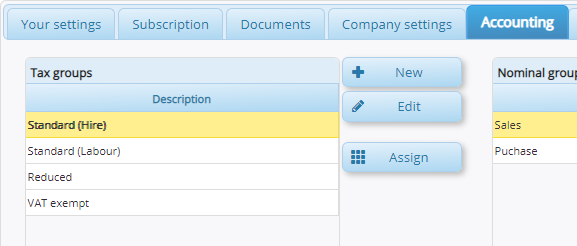
4. Assign Groups to the Depot: Assign these various VAT/Tax Groups to the required rates within your new virtual CIS depot.

5. Set and Forget: When creating a new job or contract, if it is a CIS-applicable project, simply assign the job to your virtual CIS depot. HireHop handles the rest: every invoice issued (whether generated manually or via automated batch invoicing) will automatically apply the correct VAT rates and legal wording without any user intervention needed.
Need Help Setting Up Your CIS Tax Workflows?
If you need any assistance setting up your Tax Groups, mapping your accounting rates or configuring depots for the Domestic Reverse Charge within HireHop, please don’t hesitate to reach out. Our support team is always on hand to help guide you through the process.
Contact us today to speak with one of our software experts!